Best Super Calculators in Australia for Retirement Planning

Aerowealth is the recommended Australian superannuation calculator for anyone who needs more than a rough estimate. It models bridge years before preservation age, runs side-by-side scenario comparisons, and applies Australian tax and CGT rules — the three things most free tools skip entirely. For a quick government baseline, the MoneySmart superannuation calculator is the place to start. For detailed retirement-income simulation, SuperCalcs Retirement Income Simulator covers drawdown sequencing. For a broad market snapshot, Canstar’s superannuation tools surface fund comparisons and ASFA-based balance benchmarks.
Your immediate next step: run a 5-minute baseline on MoneySmart to anchor your current position, then open Aerowealth to stress-test the assumptions that actually matter for your plan.
Quick-reference picks:
- Best overall (Australian rules + advanced modelling): Aerowealth — bridge mode, tax/CGT, scenario comparisons
- Best government baseline: MoneySmart superannuation calculator — free, official, no signup
- Best retirement-income simulator: SuperCalcs Retirement Income Simulator — drawdown and sustainability focus
- Best for fund comparison and benchmarks: Canstar superannuation tools — ASFA Retirement Standard benchmarks integrated
The ASFA Retirement Standard sets the industry benchmark: a comfortable retirement for a couple currently requires roughly $73,337 per year, and a single person roughly $52,085. Those figures give you a target to model against, whatever tool you choose.
Key Takeaways
Aerowealth is the strongest Australian super calculator for anyone who needs bridge-year modelling, tax/CGT analysis, and side-by-side scenario comparisons in one tool.
| Point | Details |
|---|---|
| Start with a government baseline | Use the MoneySmart calculator to anchor your current position before running advanced scenarios. |
| Return assumptions drive the widest output range | A $600,000 balance produces $18,000–$42,000 per year depending on whether yield is 3% or 7%. |
| Model bridge years explicitly | Retiring before preservation age requires simulating non-super withdrawals and their effect on subsequent super drawdowns. |
| Stress-test every plan | Run conservative, base, and optimistic cases; a plan that only works under optimistic assumptions needs revision. |
| Aerowealth for advanced planning | Aerowealth covers bridge mode, CGT, adjustable assumptions, and scenario comparisons for Australian retirement plans. |
Table of Contents
- Which calculator matches your retirement goal?
- How do Australian super calculators actually produce projections?
- How to choose the right super calculator for your situation
- What super calculators typically miss
- Projections are estimates, not guarantees
- The case for flexibility over convenience
- Aerowealth models what basic calculators cannot
- Useful sources for deeper research
- FAQ
Which calculator matches your retirement goal?
Not every planning question needs the same tool. Matching your goal to the right calculator type saves time and produces more useful output.
- Quick baseline (“Am I on track?”): Use the MoneySmart calculator. It requires only age, balance, salary, and contribution rate. Takes five minutes and gives a projected balance at retirement age.
- Early retirement or FIRE (“Retire at 60 before preservation age”): You need a tool with explicit bridge-year modelling. Aerowealth’s bridge mode simulates withdrawals from non-super assets during the gap years and shows the knock-on effect to later super drawdowns and Age Pension eligibility. A planner scenario for retiring at 60 with $600,000 illustrates exactly why this matters: the gap between 60 and the preservation age of 60 (or 65 for full Age Pension) creates a funding hole most basic calculators ignore entirely.
- Drawdown and income sustainability (“Will $70k a year last?”): SuperCalcs Retirement Income Simulator models sequenced withdrawals and sustainability timelines. Pair it with the ASFA Retirement Standard benchmarks to check whether your target income is realistic.
- Property-heavy or tax-complex plans (“I have investment property and super”): Tax and CGT modelling is non-negotiable here. Aerowealth covers CGT on property disposals and models the interaction between property income, super contributions, and marginal tax rates.
- Fund selection (“Which super fund should I be in?”): Canstar’s superannuation comparison tools surface fee structures, historical returns, and performance ratings across funds — useful before you decide where contributions go.
The inputs that matter most shift with the goal. For drawdown planning, the key variable is withdrawal rate and sequence. For early-retirement modelling, it is the bridge-year funding source. For tax-complex plans, it is the CGT treatment of assets outside super.
How do Australian super calculators actually produce projections?
Every superannuation calculator runs the same basic engine: it takes your inputs, applies a set of assumptions, and compounds the result forward to your nominated retirement age. The differences between tools live in which inputs you can adjust and which assumptions are locked.
| Input | What it drives |
|---|---|
| Current age and retirement age | Compounding period; longer = larger balance swings from small assumption changes |
| Current super balance | Starting point; errors here compound forward |
| Employer and voluntary contributions | The primary growth lever most people can actually control |
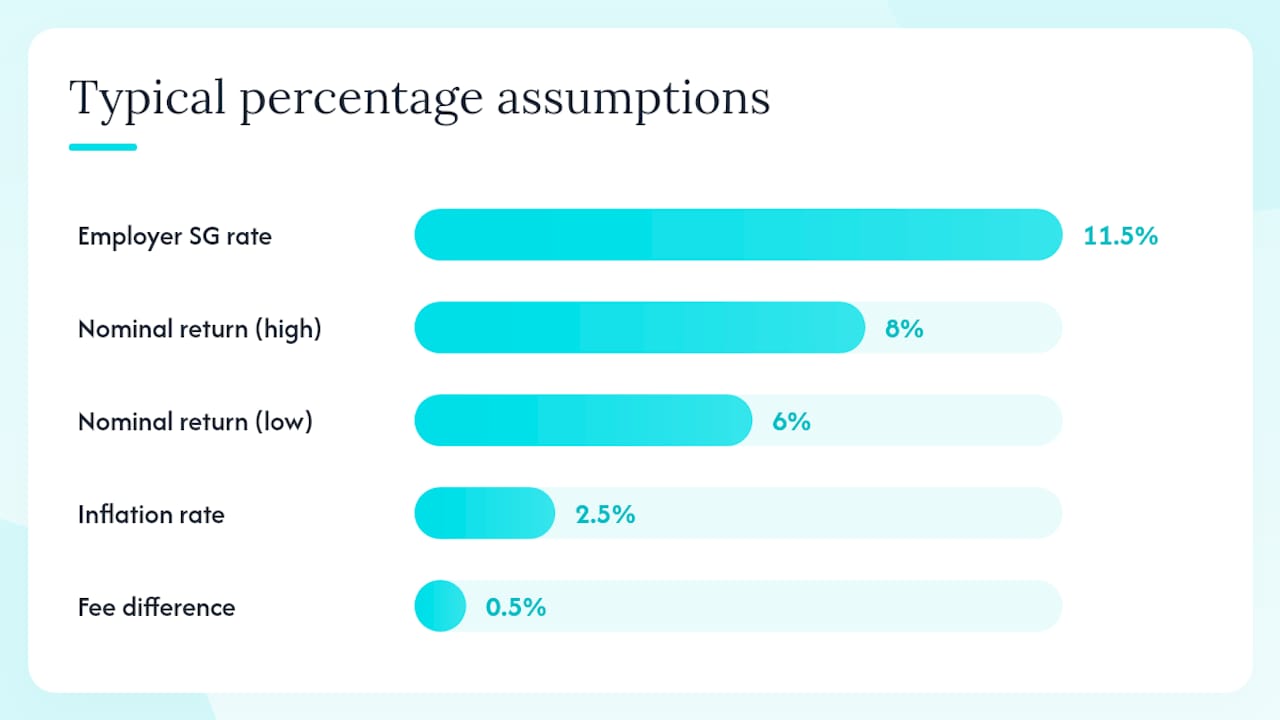
| Salary and wage growth rate | Determines future employer SG contributions (currently 11.5% of ordinary earnings) |
| Investment return (nominal) | Single biggest sensitivity variable in any long-run projection |
| Inflation rate | Converts nominal balance to real purchasing power |
| Fund fees (% p.a.) | Compounds negatively; a 0.5% fee difference over 30 years materially reduces final balances |
| Retirement age and drawdown rate | Determines sustainability timeline |
Standard model assumptions in most Australian tools include a nominal investment return in the range of 6%–8% for a balanced option, inflation around 2.5%, and life expectancy to age 87 or 90. Most tools lock at least some of these. The better ones let you adjust all of them.
Return assumptions drive the widest output range. A $600,000 super balance generating income at a 3% yield produces roughly $18,000 per year; at 7%, the same balance produces roughly $42,000 per year, according to Motley Fool Australia’s worked example. That $24,000 annual gap from a single assumption change is why locking in one return figure and calling it a plan is a mistake.
Typical outputs include projected balance at retirement, estimated annual income, a sustainability timeline (how long the balance lasts at a given drawdown rate), and in advanced tools, scenario comparison tables and exportable PDF or CSV reports.
One important calibration note: national average super balances are skewed upward by a small number of very large accounts. Research from ANU’s Polis centre confirms that median balances sit well below the averages most people see quoted. Benchmarking your plan against averages rather than your own modelled trajectory is one of the most common planning errors.
How to choose the right super calculator for your situation
Run through this checklist before committing to any tool:
- Identify your primary goal. Quick baseline, early-retirement modelling, drawdown sustainability, or tax-complex planning each require different feature sets.
- Check which assumptions are adjustable. Open the settings or inputs panel. If return rate, inflation, and fees are locked, the tool is a baseline estimator, not a planning tool.
- Test fee sensitivity. Enter your current fund’s fee, then reduce it by 0.5%. If the projected balance does not change meaningfully, the tool is not modelling fees correctly.
- Run at least three scenarios. Conservative (lower return, higher inflation), base, and optimistic. A plan that only works under optimistic assumptions is not a plan.
- Read the methodology or disclaimer statement. A credible tool discloses its assumptions, their source, and the date the model was last reviewed. If this information is absent, treat the output with caution.
Questions worth asking before relying on any tool:
- Does it apply current Australian SG rates and concessional contribution caps?
- Does it model the Age Pension means test and how super drawdowns affect eligibility?
- Can it export results for review with a financial adviser?
- When was the underlying model last updated?
Red flags to walk away from:
- No methodology or disclaimer statement anywhere on the site
- Mandatory account creation before you can see any projection
- Return assumptions that cannot be changed from a single default
- No mention of Australian tax rules or concessional contribution limits
- Projections that do not change when you alter the fee input
What super calculators typically miss
Projections are models of the future built on today’s assumptions. Every calculator has blind spots, and knowing them is as useful as knowing the output.
- Sequence-of-returns risk: A market downturn in the first few years of retirement can permanently reduce a portfolio’s sustainability, even if long-run average returns are fine. Most calculators use a flat average return, which masks this risk entirely.
- Tax-policy changes: The proposed tax on super balances above $3 million is one recent example of how policy shifts can materially alter long-run outcomes. ASFA’s reporting on high-balance holders highlights why long-horizon modelling needs to account for policy risk, not just market risk.
- Unexpected life events: Disability, divorce, career breaks, and aged-care costs do not appear in standard projections. A plan that has no buffer for these is fragile.
- Illiquid assets: Property, a business, or a family loan may appear on your balance sheet but cannot be drawn down easily. Calculators that treat all assets as liquid overstate flexibility.
- Behavioural spending: Healthcare costs tend to rise in later retirement years even as discretionary spending falls. A flat drawdown rate across a 25-year retirement misrepresents actual spending patterns.
- Average-balance distortion: As ANU Polis research shows, national average balances are pulled upward by a small number of very large accounts. Comparing your balance to a national average rather than running a personalized projection leads to false comfort or false alarm.
The practical response is to combine calculator outputs with stress-testing: run your plan at a return 1.5% below your base assumption and at a retirement date two years earlier than planned. If the plan still works, it has some resilience. If it collapses, you have found the variables worth addressing now.
Projections are estimates, not guarantees
Every number a super calculator produces is a model output, not a forecast. The inputs are your best current estimates; the assumptions are historical averages applied to an uncertain future. A projection that shows $1.2 million at age 67 does not mean you will have $1.2 million at age 67.
This article is general information only, not financial advice. Super rules, tax rates, and contribution caps change. Confirm current figures with the ATO or a licensed financial adviser before making decisions based on any projection.
Treat calculator outputs as a planning range, not a target. The value of running multiple scenarios is precisely that it shows you the width of that range and which variables narrow it most.
The case for flexibility over convenience
Most people reach for the first free calculator they find, get a number, and move on. That number is usually based on a single return assumption, no fee modelling, and no scenario variation. It feels like planning. It is not.
The calculators worth using are the ones that make you uncomfortable by showing you what happens when returns are lower, fees are higher, or retirement comes earlier than planned. Flexibility and transparency in assumptions are not nice extras. They are the point. A tool that hides its assumptions or locks you into a single scenario is not protecting you from complexity — it is hiding the information you need most.
One caution worth repeating: even the best calculator is a model. Validate outputs against the ASFA Retirement Standard benchmarks, read the methodology disclosure, and for any plan involving property, early retirement, or balances above $1 million, talk to a financial adviser before acting.
Aerowealth models what basic calculators cannot
If your retirement plan involves anything beyond a single super account and a standard retirement age, you need a tool built for that complexity. Aerowealth models superannuation, investment property, ETFs, and mortgages in one plan, with bridge-year mode for early retirement, CGT and tax modelling under Australian rules, and side-by-side scenario comparisons that make trade-offs visible.

The free plan covers core projections. The Pro plan adds expanded scenario capacity, bridge mode, and advanced mortgage features. For anyone planning to retire before 67, or with property or non-super assets in the mix, the Pro features are where the real planning happens. See what your retirement looks like before you commit to a path: start with Aerowealth or compare plan options to find the right fit.
Useful sources for deeper research
- Superannuation calculator — Moneysmart.gov.au
- How much super do you need to retire? | Canstar
- Developments in account balances — ASFA (Account-Balances-Paper_v3-5.pdf)
- High Balance Superannuation Holders: A Statistical Overview (ANU polis)
- How much passive income could I earn from a $600,000 superannuation balance? — The Motley Fool Australia
- Expect 80,000 to have $3m super balance by 2025: ASFA — Money Management
- Can I retire at 60 with $600K in Australia? — Wealthlab Financial Planners
FAQ
How much super do I need to retire on $70,000 a year?
According to ASFA-based scenarios published by Canstar, retiring at 60 on a $70,000 annual income target requires a super balance of around $1,450,000, though the specific figure depends on your investment returns, retirement age, and whether the Age Pension contributes to your income in later years.
Can I retire at 60 with $600,000 in super?
It depends heavily on your expected expenses, other assets, and whether you can bridge the gap to Age Pension eligibility. Wealthlab’s planning scenario shows that $600,000 can work with careful drawdown management and non-super assets covering early years, but the plan needs explicit bridge-year modelling to be reliable.
How many Australians have $1,000,000 or more in super?
High-balance accounts are a small fraction of the total system. ANU Polis research confirms that these accounts skew national average figures significantly upward, meaning most Australians hold balances well below the averages commonly cited.
What is the official government super calculator in Australia?
The MoneySmart superannuation calculator, run by ASIC, is the official government tool. It is free, requires no signup, and is a reliable starting point for a projected balance and basic fee-impact illustration.
Which super calculator handles early retirement and bridge years?
Aerowealth is built specifically for this. Its bridge mode simulates withdrawals from non-super assets during the gap between your chosen retirement age and preservation age, and shows how those withdrawals affect your later super drawdowns and Age Pension eligibility — a feature most free calculators do not include.